Tool guide · for softphone users
Krisp for VoIP calls: setup, pricing and the free-tier reality
By the LineSide desk · krisp.ai pricing & help docs read 2026-09-20
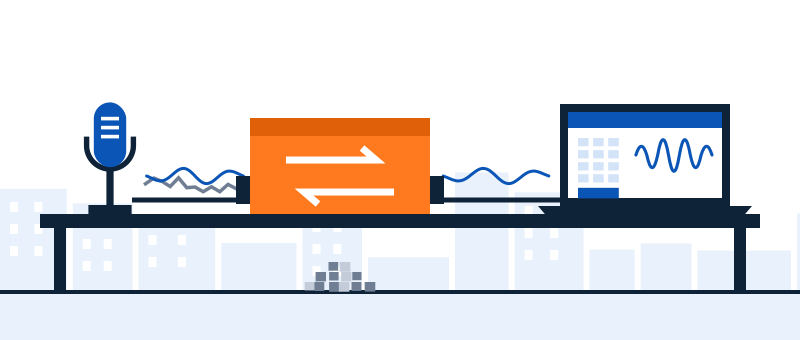
Krisp matters to softphone users for one architectural reason: it filters noise at the device level, as a virtual microphone and speaker, so it works identically under RingCentral, 3CX, Zoiper, VBC and anything else with a device picker — including every app that ships no noise handling of its own. This page is the VoIP-specific manual: what it does, the setup order that avoids the classic mistakes, what it costs as of today, and the honest state of the free tier.
Why the virtual-device pattern fits softphones
Meeting apps increasingly ship their own suppression; the business-phone world is patchier — our six-app matrix has two apps shipping nothing at all. A device-level filter sidesteps the whole lottery:
- The app doesn't need to cooperate. Krisp appears as "Krisp Microphone" and "Krisp Speaker"; the softphone just selects them. Krisp's own site describes exactly this pattern, and its help center maintains softphone-specific setup articles — RingCentral and Vonage Business among them (confirmed live 2026-09-20).
- Both directions. Mic filtering cleans what your callers hear; speaker filtering cleans what you hear — the underrated half for anyone taking calls from cars, kitchens and warehouses all day.
- One setup, every app. The same install covers your softphone, your meeting tool and whatever IT deploys next quarter. No per-app roulette.
- Pedigree, for what it's worth: Krisp's engine is what Vonage embedded in its contact-center product (announced March 2024), and Krisp's site names RingCentral among brands using its SDK. The tool you'd install is the consumer face of infrastructure the phone vendors themselves buy.
What callers hear
- Your physical mic
- Krisp Microphone
- Your softphone
What you hear
- Your softphone
- Krisp Speaker
- Your headset
Setup order for a softphone (do it in this order)
- Tune the free stuff first. Right device, sane gain, boost off — the ten-minute tune-up. A filter can't fix a clipped or wrong-device signal.
- Install Krisp and pick your real hardware inside it. Krisp needs to know which physical mic and speaker you use; it filters between them and the virtual devices.
- Select the Krisp devices in the softphone. Dialpad: Hardware Settings. VBC: profile → Settings → Audio. Zoiper/3CX: audio device selection. Enable mic filtering at minimum; add speaker filtering if inbound noise is part of your day.
- Turn off the app's own suppression. One filter per direction — leaving AI Voice Isolation or Aircall's toggle stacked under Krisp produces the watery, word-clipping sound we dissect in the double-suppression note.
- Test against your real noise, both directions. Type and talk for the mic side; have a noisy caller (or a phone playing café sounds near your speaker's far end) for the inbound side.
What it costs — verified today, hedged honestly
Read directly from krisp.ai's pricing page on 2026-09-20:
- Trial: 7 days free, no credit card required.
- Core: $16/month billed monthly, or $8/month billed annually.
- Advanced: $30/month monthly or $15/month annually. (Meeting-AI extras; for pure softphone noise removal, Core is the relevant tier.)
- Call-center lineup: a separate "CC" product family exists (CC Core listed at $15/agent/month billed annually) — relevant if you're outfitting a queue, not a desk.
Billed annually halves the monthly figure on both plans. The 7-day trial needs no card.
The free-tier reality, stated carefully: as of 2026-09-20, Krisp's pricing page leads with the 7-day trial and paid plans — no free tier is advertised there. The old free plan (60 minutes of noise removal per day, resetting at midnight GMT, with a 1.5× bump for work-email signups) survives only in Krisp's help-center documentation. We can't tell you whether new signups still receive it, and we won't guess. If a daily free hour is the plan you're counting on, verify what your account actually gets before building a workflow on it.
One more planning note: the noise-removal minutes described in Krisp's help docs are a desktop-app concept. Treat Krisp-for-softphones as a Windows/Mac desktop pattern; don't design a mobile-softphone workflow around it.
The honest limitations list
- It's a subscription doing what some apps do free. If you live entirely inside Dialpad or a current RingCentral build, the built-in may be all you need — check your app's row before paying for anything. We link Krisp because of the apps that ship nothing; we say so everywhere.
- It sits in the path of live calls. Real-time processing of your conversations — if your calls carry confidential material, read Krisp's privacy/processing documentation before deploying, and involve whoever owns compliance before rolling it out to a team.
- It uses CPU. Modest, but on an already-straining laptop it's one more real-time process. (The same laptops are where Dialpad's built-in auto-disables — thin hardware has no free lunch.)
- It can't fix the line. Crackle, stutter and warble are network damage; see the diagnosis table before spending anything.
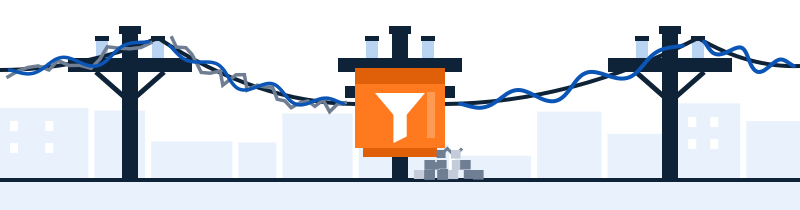
Try it against your actual room
The 7-day trial needs no card, which makes the test cheap: install, select Krisp Microphone in your softphone, and make real calls from your real desk. If callers can't tell the difference, cancel and keep the built-ins. Plans from $8/month billed annually if they can (all figures checked 2026-09-20).
Start the 7-day Krisp trial → Sponsored line: subscribe through this button and Krisp may pay LineSide a commission. That's disclosed here because it's true everywhere: it never changes the limitations list above.Quick answers
- Does Krisp work with softphones like 3CX, Zoiper or VBC?
- Yes — it installs as a virtual mic and speaker, so any softphone with a device picker can use it. Krisp's help center documents RingCentral and Vonage Business setups specifically (confirmed 2026-09-20); the pattern is identical for the rest.
- Is Krisp still free?
- Carefully: the pricing page (read 2026-09-20) advertises a 7-day trial and paid plans, not a free tier. The 60-minutes-per-day free plan persists in help-center docs, and we can't confirm what new accounts receive. Verify on your own account before relying on it.
- Should I run Krisp and my softphone's built-in suppression together?
- No — one filter per direction. Krisp under the app means the app's own toggle goes off; stacked suppressors degrade each other audibly.
- Does Krisp remove noise from the caller's side?
- Yes — that's the speaker-side toggle: it filters the audio arriving at your ears, independent of anything the caller does. For softphone users dealing with noisy inbound calls, it's often the bigger win.
Not sure you need a paid layer at all? Start with the cornerstone guide — its first two layers are free, and for plenty of rooms they're enough.