Troubleshooting · softphones
Choppy or robotic VoIP calls: is it the network or your noise suppression?
By the LineSide desk
Choppy, robotic or "breaking up" VoIP audio has two families of cause, and they need opposite fixes. Network damage (jitter, lost packets, delay) chops words out after they leave your machine. Audio processing (an over-eager noise suppressor, a gate, automatic gain control, or two suppressors stacked) chops them before they leave. Every vendor guide we read blames the network first. Sometimes it is your own filters, and a two-minute test tells you which.
A noise layer for this app
Krisp installs as a virtual microphone and speaker that VoIP apps can select.
Get KrispTwo kinds of choppy, two fixes
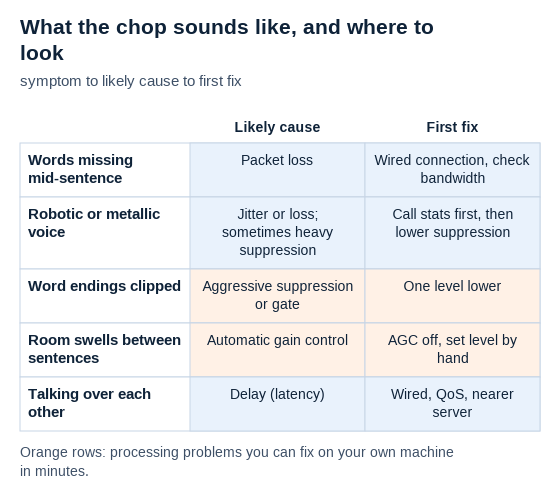
Network chop is random. Words or syllables vanish mid-sentence, the voice turns metallic for a second, then recovers. It gets worse when someone starts a video upload or the Wi-Fi gets busy, and it can hit both directions at once. Processing chop is patterned. The ends of words get clipped, quiet syllables disappear, your voice "gates" on and off as you pause, or the background swells up between sentences. It follows you, not your connection, and it usually starts after you changed a setting or installed something.
Vendors document both. Nextiva's troubleshooting article puts choppy audio down to "delayed or lost packets" between its servers and your phones. But 8x8's own help page warns that its strongest noise suppression level "uses more computer resources and the audio quality will have a rumbly or boxy / muddy effect", Genesys tells users of its WebRTC phone to clear automatic mic gain "if you experience microphone volume fluctuation", and Talkdesk's guide says "running multiple layers of processing can sometimes reduce audio quality". All read on 18 Oct 2026. The network is the usual suspect, not the only one.
The test: local recording, then call stats
You need three minutes and nothing you have to buy.
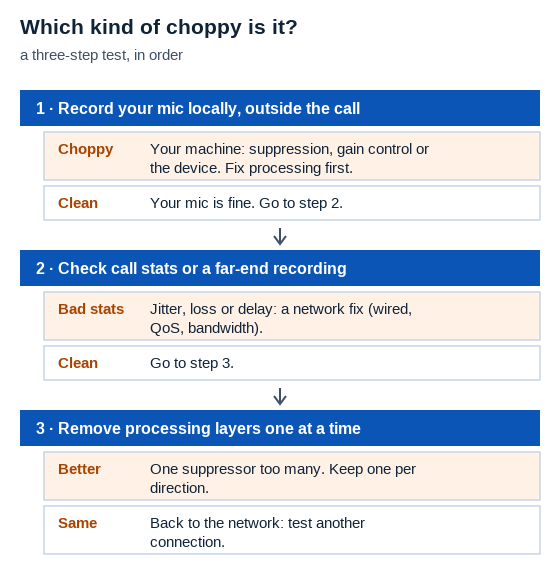
Step one is the decisive one. Open your operating system's voice recorder, select the same microphone your softphone uses, and record thirty seconds of normal speech with your usual background running. A local recording never touches the internet. If it is already clipped or pumping, the network is innocent: something on your machine is processing the audio, whether a headset utility, an operating-system effect or a noise app. If it is clean, the softphone's own processing or the line is next.
Step two uses whatever the call itself can tell you. Many softphones and admin portals show per-call quality statistics; if yours does, look at jitter, packet loss and round-trip delay for a bad call. If not, ask the person you called to describe the sound, or check your platform's call recording if you have one. Damage that appears on the far end but not in your local recording happened on the way.
Step three handles the case where both look acceptable but calls still sound wrong: switch off processing layers one at a time, in the softphone first, then in any separate noise app, and make a test call after each change.
Network chop: the short fix list
When the evidence points at the line, the fixes are standard and boring, and they work. Nextiva's guidance, read on 18 Oct 2026, gives two thresholds worth knowing; they are one vendor's figures, not a universal standard:
| Measure | Nextiva says audio degrades above | Usual first fix |
|---|---|---|
| Jitter | 20 ms | QoS on the router, prioritising voice traffic |
| Latency | 150 ms | QoS; wired connection; check the route to the provider |
| Packet loss | No figure given | Bandwidth check, router load, cables, then the ISP |
In practice the order is: move to a wired connection if you can, stop the big uploads during calls, run a speed test against what you pay for, and ask whoever manages the router about quality-of-service rules for voice. Nextiva also lists overloaded routers and damaged cables among the causes of packet loss, which is why "restart the router and reseat the cable" is not as silly as it sounds. If all of that is clean and calls still break up, the problem is upstream, at the ISP or the provider, and the ticket goes to them.
Processing chop: suppression and AGC artifacts
Noise suppression works by deciding, many times a second, what is voice and what is not. Turn it up too far and it starts mistaking the quiet parts of your voice for noise: the ends of words, soft consonants, a trailing "s". Noise gates do the same thing more crudely, cutting the microphone off entirely below a threshold. Automatic gain control fails differently: it turns your level up when you go quiet, so the room rises between sentences, then drops when you talk again.
The fixes, in order: lower the suppression one step (on 8x8, from Very high to High; see our 8x8 levels guide), turn off automatic gain control and set your input level by hand, and make sure only one suppressor runs in each direction. Headset utilities, operating-system voice effects, the softphone's own filter and a separate app like Krisp can all be on at once without you noticing. Our note on double suppression explains why two filters sound worse than one, and the softphone mic settings guide covers the manual input level.

One filter, chosen on purpose
If your test showed processing chop from stacked filters, pick one suppressor and switch the rest off. Krisp is one option that runs under every calling app on Windows or Mac. It has no $0 tier: a card-free trial runs for a week, and Core then costs $8 a month on a yearly bill or $16 paid monthly (krisp.ai, read 2026-10-18). If your softphone's own filter already sounds right, keep that one and spend nothing.
Try one filter, not three → No noise tool fixes network chop, and we would rather you fixed the router first.Edge cases that look like the network but are not
A busy or underpowered computer. Real-time noise processing needs CPU time, and when it does not get it, audio stutters even on a perfect connection. 8x8 notes that its strongest level "uses more computer resources", and AWS sets a four-core minimum before it will run its own agent audio enhancement. Close the browser tabs, plug the laptop in, and test again before blaming the line.
Bluetooth headsets. Wireless links add their own dropouts and sometimes switch to a lower-quality mode when the microphone opens. Talkdesk's audio guidance recommends a wired headset and says to avoid Bluetooth for calls; a quick test on wired earphones settles whether the headset is the weak link.
VPNs and remote desktops. A VPN adds distance to every packet, and a virtual desktop may route audio through the remote server before it reaches the softphone. If calls are clean off the VPN or outside the virtual desktop, that is your answer, and your IT team's problem to route around.
Both at once. A machine that is short of CPU on a busy Wi-Fi network will show both kinds of chop. Fix the processing side first, because it is under your control and takes minutes, then measure the network again.
Codecs and choppy audio
Codecs carry audio; they do not clean it. Some are better than others at hiding a lost packet, and a softphone that drops to a narrowband codec on a weak connection will sound thinner, but changing the codec is a network-side decision, not a noise fix. Our codec guide explains what each common codec does to your voice.
Quick answers
- Why is my VoIP call choppy?
- Usually lost or delayed packets on the network. But aggressive noise suppression, noise gates, automatic gain control or two suppressors stacked can also clip your voice. Record your mic locally to tell them apart.
- Why does my voice sound robotic on VoIP calls?
- Robotic or metallic audio is a classic sign of jitter or packet loss. If your local recording also sounds robotic, look at heavy noise suppression on your machine instead.
- Can noise cancellation make calls choppy?
- Yes, when it is set too strong or stacked with another filter. It tends to clip word endings and quiet syllables. Drop one level and keep one suppressor per direction.
- What jitter and latency are too high for VoIP?
- Nextiva's guidance, read 18 Oct 2026, says jitter over 20 ms and latency over 150 ms degrade call audio. Other providers publish their own figures; check yours.
- Does Wi-Fi cause choppy calls?
- It often contributes, because Wi-Fi adds jitter and loss when it is busy or the signal is weak. A wired connection is the simplest test.
Once the line is clean and the filters are down to one, the per-app noise controls are mapped in our VoIP background noise guide.